Note 0
-
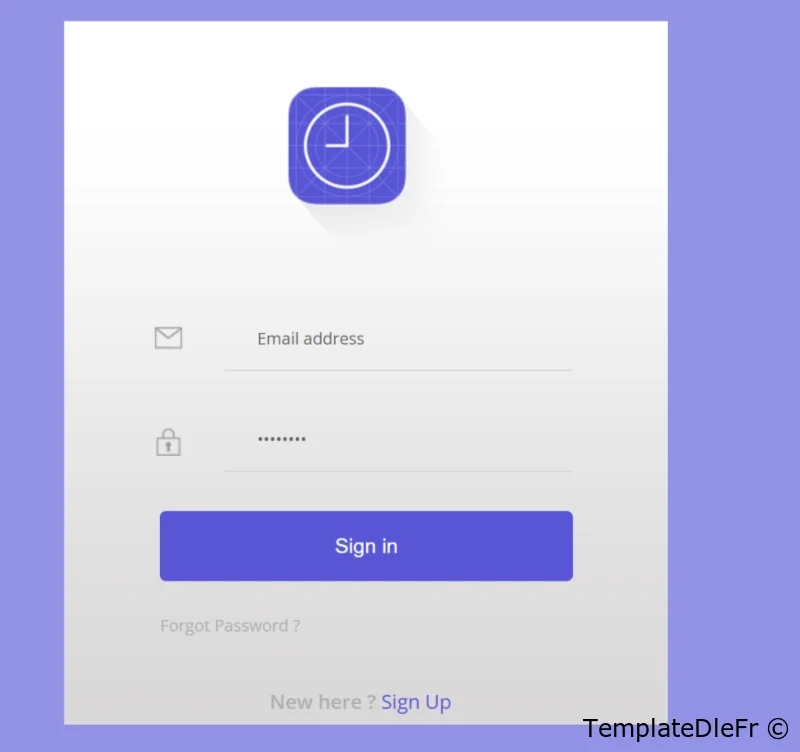
Ce plugin consiste en une page de connexion distincte, pour un site web utilisant DLE version 17.x à 20.0
Son installation est extrêmement simple et ne nécessite que des modifications minimes.Installation:
- Installer le plugin .xml via administration/ utilitaires/ Gestions des plugins
- Envoyez le contenu du dossier images dans le dossier images de votre thème
- Envoyer le fichier login.php du dossier engine/modules dans le dossier modules de votre site.
Ouvrez le votre fichier de style css et coller tout en bas le code ci-dessous
.app-timer{
  width:28%;
  margin:0 auto;
  text-align: center;
  background:url("../images/bg.jpg")0px 0px no-repeat;
  padding: 3em 5em;
  background-size: 100% 100%;
  position: relative;
}
form {
    padding: 3% 3% 5% 3%;
}
form li{
  list-style: none;
  width:100%;
  font-weight: 500;
  background:none;
  margin:0.6em 0;
  outline: none;
}
.icon {
 height:29px;
  width: 29px;
  display: block;
  float: left;
  margin: 33px 37px 0px -5px;
}
.email {
  background: url(../images/icons.png) no-repeat 0px 0px;
}
.lock {
  background: url(../images/icons.png) no-repeat 0px -58px;
}
/*-----*/
.timer img {
   margin: 1em 0;
}
.app-timer input[type="text"],.app-timer input[type="password"]{
  width:72.2%;
  padding: 1.25em 1em 1.25em 2em;
  color: #626262;
  font-size: 16px;
  outline: none;
  font-weight: 500;
  border: none;
  border-bottom: 1px solid #ccc;
  font-family: 'Open Sans', sans-serif;
  background:none;
  margin:0.8em 0;
  }
.submit {
  margin: 1em 0;
}
.app-timer p{
  text-align: left;
    padding: 1em 0;
}
.app-timer input[type="submit"]{
  font-size: 20px;
  font-weight: 300;
  color: #fff;
  cursor: pointer;
  outline: none;
  padding:20px 20px;
  width:100%;
  border:none;
  moz-transition: all 0.3s;
  -o-transition: all 0.3s;
  -webkit-transition: all 0.3s;
  transition: all 0.3s;
  background:#5856d6;
  border-radius:0.3em;
  -webkit-border-radius:0.3em;
  -o-border-radius:0.3em;
  -moz-border-radius:0.3em;
  border: 3px solid #5856d6;
}
input[type="submit"]:hover{
  border: 3px dotted #fff;
}
.app-timer p a,.whyt p{
  color:#AFAFB0;
  font-weight: 400;
  font-size: 1em;
}
.whyt p{
  font-size: 1.2em;
  font-weight:600;
  }
.whyt p a {
  color: #5856d6;
}
.whyt {
  position: absolute;
  bottom: -2%;
  left: 34%;
}
.whyt p{
  padding: 1.2em 0;
}
.app-timer p a:hover,.app-timer h4 a:hover{
  text-decoration: underline;
}
/*-----start-responsive-design------*/
@media (max-width:1440px){
  .app-timer{
    width:30%;
  }
  .app-timer input[type="text"],.app-timer input[type="password"]{
    width:71.2%;

  }
  .icon {
  margin: 37px 10px 0px -5px;
  }
}
@media (max-width:1366px){
  .app-timer{
    width: 30%;
  }
.app-timer input[type="text"], .app-timer input[type="password"] {
    width: 78.7%;
    padding: 1.25em 0em 1.25em 1em;
  }

}
@media (max-width:1280px){
  .app-timer {
  width: 35%;
  }
  .app-timer input[type="text"], .app-timer input[type="password"] {
    width: 79.7%;
  }

}
@media (max-width:1024px){
  .app-timer {
  width: 47%;
  }
  .app-timer input[type="text"], .app-timer input[type="password"] {
    width: 80.7%;
  }
  .whyt p {
  font-size: 1.1em;
  }

}
@media (max-width:768px){
  .cam img {
  margin: 2em 0;
}
.app-timer {
  width: 54%;
    margin: 0 auto 0 12%;
}
.app-timer input[type="text"], .app-timer input[type="password"] {
    width: 77.7%;
  }

}
@media (max-width:640px){
.app-timer input[type="text"], .app-timer input[type="password"] {
      width: 78.8%;
}
.app-timer {
  width: 65%;
  margin: 0 auto 0 4.5%;
}
}
@media (max-width:480px){
  form {
  width: 94%;
  margin: 0 auto;
  }
  .app-timer input[type="submit"] {
  font-size: 18px;
  padding: 14px 15px;
  }
 .app-timer {
  width: 68%;
  margin: 0 auto 0 2.2%;
  padding: 1em 4em 2em 4em;
}
.app-timer p a, .app-timer h4 a {
  font-size: 0.9em;
}
.app-timer p {
  padding-top: 0em;
}
.app-timer h4 {
  font-size: 1em;
}
.app-timer input[type="text"], .app-timer input[type="password"] {
  width: 65.8%;
  padding: 1.1em 1em 1.1em 1.5em;
  font-size: 14px;
}
.timer img {
  margin:3em 0 0 0;
  width: 41%;
  }
  .whyt {
  position: absolute;
  bottom: -2%;
  left: 35%;
}
}
@media (max-width:320px){
 .app-timer {
  width: 85%;
  padding: 0em 1em 1em 1em;
  margin: 0 auto 0 2.2%;
}
.app-timer p a, .app-timer h4 a {
  font-size: 0.8em;
}
.whyt p {
  font-size:0.9em;
}
.whyt p a{
  font-size:1em;
}
.whyt {
  bottom: -5%;
  left: 27%;
}
.submit {
  margin: 0.5em 0;
}
.app-timer input[type="submit"] {
  font-size: 18px;
  padding: 10px 10px;
}
.app-timer p {
    padding: 1em 0 2em 0;
}
 .app-timer input[type="text"], .app-timer input[type="password"] {
  width:78.8%;
  padding: 1em 1em 1em 0em;
  font-size: 13px;
}
.icon {
  height:29px;
  width: 29px;
  display: block;
  float: left;
  margin: 23px 4px 0px -5px;
}
form {
  width:98%;
  margin: 0 auto;
}
.timer img {
    width: 37%;
  }
  .email {
  background: url(../images/icons.png) no-repeat 0px 4px;
  background-size:67%;
}
.lock {
  background: url(../images/icons.png) no-repeat 0px -50px;
  background-size:67%;
}
form li {
  margin: 0.3em 0;
  }
}
Ouvrez le fichier login.tpl et cherchez [group=5] [/group] et supprimer tout ce qu'il y a entre les deux baliseset coller le code ci-dessous<div class="app-timer"> <div class="timer"><img src="images/timer.png" class="img-responsive" alt="" /></div> <form method="post"> <ul> <li> <a href="#" class=" icon email"></a> <input type="text" class="text" name="login_name" id="login_name" placeholder="Saisissez votre pseudo ou E-mail" > </li> <li> <a href="#" class=" icon lock"></a> <input type="password" name="login_password" id="login_password" placeholder="Saisissez votre mot de passe"> </li> <div class="clear"></div> <div class="submit"><input type="submit" onclick="submit();" value="Entrer" ></div> <div class="clear"></div> <p><a href="{lostpassword-link}" class="font-small">Mot de passe perdu?</a></p> </ul> <input name="login" type="hidden" id="login" value="submit"> </form> <div class="whyt"><p>Vous n'avez pas encore de compte? ?<a href="{registration-link}"> Inscrivez-vous</a></p></div> </div>Ouvrez le fichier main ou header.tpl tout dépend de votre thème et chercher
[group=5] <li>{login}</li>[/group]Sa peut-être un lien mais toujours entre ces balises [group=5] [/group] Que vous remplacez par
<li><a href="/index.php?do=signin" class="user-btn circle">Connexion</a></li>Ce qui donnera avec les balises
	   [group=5]
               <li><a href="/index.php?do=signin" class="user-btn circle"><i class="bi bi-person-bounding-box"></i></a></li>
            [/group]
Voila c'est tout!
-
Installation:
- Installer le plugin .xml via administration/ utilitaires/ Gestions des plugins
- Envoyez le contenu du dossier images dans le dossier images de votre thème
- Envoyer le fichier login.php du dossier engine/modules dans le dossier modules de votre site.
Ouvrez le votre fichier de style css et coller tout en bas le code ci-dessous
.app-timer{
  width:28%;
  margin:0 auto;
  text-align: center;
  background:url("../images/bg.jpg")0px 0px no-repeat;
  padding: 3em 5em;
  background-size: 100% 100%;
  position: relative;
}
form {
    padding: 3% 3% 5% 3%;
}
form li{
  list-style: none;
  width:100%;
  font-weight: 500;
  background:none;
  margin:0.6em 0;
  outline: none;
}
.icon {
 height:29px;
  width: 29px;
  display: block;
  float: left;
  margin: 33px 37px 0px -5px;
}
.email {
  background: url(../images/icons.png) no-repeat 0px 0px;
}
.lock {
  background: url(../images/icons.png) no-repeat 0px -58px;
}
/*-----*/
.timer img {
   margin: 1em 0;
}
.app-timer input[type="text"],.app-timer input[type="password"]{
  width:72.2%;
  padding: 1.25em 1em 1.25em 2em;
  color: #626262;
  font-size: 16px;
  outline: none;
  font-weight: 500;
  border: none;
  border-bottom: 1px solid #ccc;
  font-family: 'Open Sans', sans-serif;
  background:none;
  margin:0.8em 0;
  }
.submit {
  margin: 1em 0;
}
.app-timer p{
  text-align: left;
    padding: 1em 0;
}
.app-timer input[type="submit"]{
  font-size: 20px;
  font-weight: 300;
  color: #fff;
  cursor: pointer;
  outline: none;
  padding:20px 20px;
  width:100%;
  border:none;
  moz-transition: all 0.3s;
  -o-transition: all 0.3s;
  -webkit-transition: all 0.3s;
  transition: all 0.3s;
  background:#5856d6;
  border-radius:0.3em;
  -webkit-border-radius:0.3em;
  -o-border-radius:0.3em;
  -moz-border-radius:0.3em;
  border: 3px solid #5856d6;
}
input[type="submit"]:hover{
  border: 3px dotted #fff;
}
.app-timer p a,.whyt p{
  color:#AFAFB0;
  font-weight: 400;
  font-size: 1em;
}
.whyt p{
  font-size: 1.2em;
  font-weight:600;
  }
.whyt p a {
  color: #5856d6;
}
.whyt {
  position: absolute;
  bottom: -2%;
  left: 34%;
}
.whyt p{
  padding: 1.2em 0;
}
.app-timer p a:hover,.app-timer h4 a:hover{
  text-decoration: underline;
}
/*-----start-responsive-design------*/
@media (max-width:1440px){
  .app-timer{
    width:30%;
  }
  .app-timer input[type="text"],.app-timer input[type="password"]{
    width:71.2%;

  }
  .icon {
  margin: 37px 10px 0px -5px;
  }
}
@media (max-width:1366px){
  .app-timer{
    width: 30%;
  }
.app-timer input[type="text"], .app-timer input[type="password"] {
    width: 78.7%;
    padding: 1.25em 0em 1.25em 1em;
  }

}
@media (max-width:1280px){
  .app-timer {
  width: 35%;
  }
  .app-timer input[type="text"], .app-timer input[type="password"] {
    width: 79.7%;
  }

}
@media (max-width:1024px){
  .app-timer {
  width: 47%;
  }
  .app-timer input[type="text"], .app-timer input[type="password"] {
    width: 80.7%;
  }
  .whyt p {
  font-size: 1.1em;
  }

}
@media (max-width:768px){
  .cam img {
  margin: 2em 0;
}
.app-timer {
  width: 54%;
    margin: 0 auto 0 12%;
}
.app-timer input[type="text"], .app-timer input[type="password"] {
    width: 77.7%;
  }

}
@media (max-width:640px){
.app-timer input[type="text"], .app-timer input[type="password"] {
      width: 78.8%;
}
.app-timer {
  width: 65%;
  margin: 0 auto 0 4.5%;
}
}
@media (max-width:480px){
  form {
  width: 94%;
  margin: 0 auto;
  }
  .app-timer input[type="submit"] {
  font-size: 18px;
  padding: 14px 15px;
  }
 .app-timer {
  width: 68%;
  margin: 0 auto 0 2.2%;
  padding: 1em 4em 2em 4em;
}
.app-timer p a, .app-timer h4 a {
  font-size: 0.9em;
}
.app-timer p {
  padding-top: 0em;
}
.app-timer h4 {
  font-size: 1em;
}
.app-timer input[type="text"], .app-timer input[type="password"] {
  width: 65.8%;
  padding: 1.1em 1em 1.1em 1.5em;
  font-size: 14px;
}
.timer img {
  margin:3em 0 0 0;
  width: 41%;
  }
  .whyt {
  position: absolute;
  bottom: -2%;
  left: 35%;
}
}
@media (max-width:320px){
 .app-timer {
  width: 85%;
  padding: 0em 1em 1em 1em;
  margin: 0 auto 0 2.2%;
}
.app-timer p a, .app-timer h4 a {
  font-size: 0.8em;
}
.whyt p {
  font-size:0.9em;
}
.whyt p a{
  font-size:1em;
}
.whyt {
  bottom: -5%;
  left: 27%;
}
.submit {
  margin: 0.5em 0;
}
.app-timer input[type="submit"] {
  font-size: 18px;
  padding: 10px 10px;
}
.app-timer p {
    padding: 1em 0 2em 0;
}
 .app-timer input[type="text"], .app-timer input[type="password"] {
  width:78.8%;
  padding: 1em 1em 1em 0em;
  font-size: 13px;
}
.icon {
  height:29px;
  width: 29px;
  display: block;
  float: left;
  margin: 23px 4px 0px -5px;
}
form {
  width:98%;
  margin: 0 auto;
}
.timer img {
    width: 37%;
  }
  .email {
  background: url(../images/icons.png) no-repeat 0px 4px;
  background-size:67%;
}
.lock {
  background: url(../images/icons.png) no-repeat 0px -50px;
  background-size:67%;
}
form li {
  margin: 0.3em 0;
  }
}
Ouvrez le fichier login.tpl et cherchez [group=5] [/group] et supprimer tout ce qu'il y a entre les deux baliseset coller le code ci-dessous<div class="app-timer"> <div class="timer"><img src="images/timer.png" class="img-responsive" alt="" /></div> <form method="post"> <ul> <li> <a href="#" class=" icon email"></a> <input type="text" class="text" name="login_name" id="login_name" placeholder="Saisissez votre pseudo ou E-mail" > </li> <li> <a href="#" class=" icon lock"></a> <input type="password" name="login_password" id="login_password" placeholder="Saisissez votre mot de passe"> </li> <div class="clear"></div> <div class="submit"><input type="submit" onclick="submit();" value="Entrer" ></div> <div class="clear"></div> <p><a href="{lostpassword-link}" class="font-small">Mot de passe perdu?</a></p> </ul> <input name="login" type="hidden" id="login" value="submit"> </form> <div class="whyt"><p>Vous n'avez pas encore de compte? ?<a href="{registration-link}"> Inscrivez-vous</a></p></div> </div>Ouvrez le fichier main ou header.tpl tout dépend de votre thème et chercher
[group=5] <li>{login}</li>[/group]Sa peut-être un lien mais toujours entre ces balises [group=5] [/group] Que vous remplacez par
<li><a href="/index.php?do=signin" class="user-btn circle">Connexion</a></li>Ce qui donnera avec les balises
	   [group=5]
               <li><a href="/index.php?do=signin" class="user-btn circle"><i class="bi bi-person-bounding-box"></i></a></li>
            [/group]
Voila c'est tout!
-
Vous n’êtes pas autorisé à télécharger des fichiers depuis notre serveur. Si vous voulez avoir accés aux téléchargements veuillez vous connecter ou inscrivez-vous sur le site c'est gratuit!
Informations complèmentaires
- Auteur: Terramoune Modifié par DarkLane
- Version DLE: 17.0
Personne n'a encore remercié!