Note 1
-
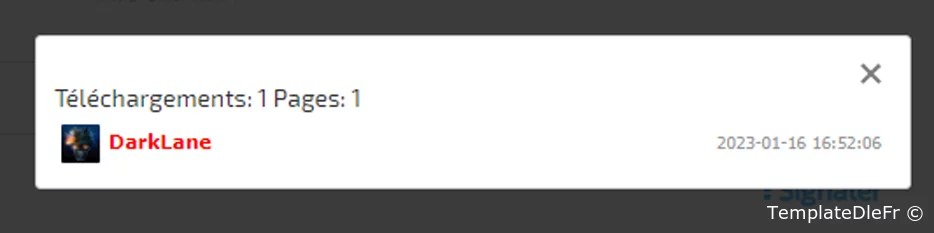
Mise à jour du module, dont la version précédente était publié plus tôt , qui garde une trace des téléchargements de fichiers et qui permet d'afficher une liste des utilisateurs qui ont téléchargé un fichier particulier.
Auteur: TerraMoune
Version Dle: 15.x -
Installation:
Installez le module via le système de plugins DLE.
Ouvrez main.tpl de votre thème et trouvez</head>
Et ajouter au dessus<link rel="stylesheet" href="https://cdnjs.cloudflare.com/ajax/libs/magnific-popup.js/1.1.0/magnific-popup.css" /> <script src="https://cdnjs.cloudflare.com/ajax/libs/magnific-popup.js/1.1.0/jquery.magnific-popup.js"></script>
Ajouter à la fin du fichier css de votre thème:/** Who download module **/ .who-download { width: 500px; margin: 0 auto; position: relative; background: #FFF; padding: 25px 10px 10px; border-radius: 3px; border: 1px solid #ccc; } #who-download ul { list-style-type: none; margin: 0; padding: 0; } #who-download li { font: normal 11px/22px Verdana; cursor: pointer; border-radius: 2px; position: relative; } #download-list li { padding: 4px; } #who-download ul li:hover { color: #000; background-color: #f5f5f8; } #who-download li a { display: inline-block; white-space: nowrap; overflow: hidden; text-overflow: ellipsis; vertical-align: middle; width: 75%; } #who-download li .download-date { position: absolute; right: 6px; top: 4px; font: normal 10px/22px Tahoma; color: #999; } #who-download li img { display: inline-block; vertical-align: middle; height: 22px; width: 22px; border-radius: 1px; margin-right: 5px; } #download-list-nav {width: 100px;margin: 0 auto;} #download-list-nav li {font-size: 20px;font-weight: 700;cursor: pointer;} #download-list-nav li.disabled {color:#AAA;} #download-list-nav li:nth-child(1) {float:left} #download-list-nav li:nth-child(2) {float:right;} /** Who download END **/
Ajouter tout en bas dans un fichier JS de votre thèmefunction who_download_list(id, area) { //ShowLoading(); $.post( dle_root + 'engine/ajax/controller.php?mod=who_download', {id: id, static_area: area, user_hash: dle_login_hash}, function(data){ //HideLoading(); if( data == 'null' ) { //Box.InfoNormal('who-download', 'Information', 'Le fichier n\'a pas été téléchargé', 400, 2000); DLEalert('Il y a eu aucun téléchargement', 'Information',); } else { $.magnificPopup.open({ items: { src: '<div class="who-download clrfix">'+data+'</div>' }, type: 'inline', mainClass: 'mfp-fade', removalDelay: 0, overflowY: 'hide', closeOnBgClick: true, callbacks: { open: function() { /*new LazyLoad({ elements_selector: "#download-list img[data-src]", threshold: 0, load_delay: 250 });*/ }, afterClose: function() {}, beforeClose: function() {} } }); } }); return false; }
Utilisation:
Dans le modèle attachment.tpl, placez un lien/bouton/objet à votre guise. à laquelle vous voulez que la fonction who_download_list({id}, {area}) soit appelée.
Exemple:<span onclick="who_download_list({id}, {area})">Qui a téléchargé?</span> -
Vous n’êtes pas autorisé à télécharger des fichiers depuis notre serveur. Si vous voulez avoir accés aux téléchargements veuillez vous connecter ou inscrivez-vous sur le site c'est gratuit!
Informations complèmentaires
Personne n'a encore remercié!
Personne n'a encore remercié!

DarkLane
Groupe: AdministrateursArticles similaire
Please write your comments in French; any comments written in a language other than French will not be replied to. Please use an online translator for this. Thank you!!
Discution
Aucun commentaire pour le moment — soyez le premier.